Plugin Tracker List
Use this wiki plugin for Trackers to display a report of the listed items of a Tracker. You can choose which fields you want to display, you can display status of the items, and you have the opportunity to filter the items. Only fields set as public are available through the plugin.
Parameters
-
These parameters allow the user to filter, sort or paginate the results of the trackerlist query. To pre-filter or sort results before the user sees them, use the parameters in the general and filtering tabs.
In order to use tablesorter,
- Javascript must be enabled
- Enabled by default at Admin > Features > Programmer (tab)
- jQuery Sortable Tables must be activated
- Enable at Admin > Features > Interface (tab)
- For the server parameter to work for a plugin, ajax must be enabled
- Enable at Admin > Features > Interface (tab)
More information on parameters
- when
filterfieldis a dropdown box,exactvaluemust be the text of the item in the drop down list without quotation marks - when
filterfieldis a category,exactvaluemust be the numeric id (without quotation marks) of the category item to filter the list - when
filterfieldis a checkbox,exactvalueis y or n
Please note that there might be a bug in Tiki 9.x and later versions, which causes filterfield to work only for Admins when the fields parameter is missing. To make it work for other Groups, you need to set fields parameter and explicitly name all fields you want to display. For example:
{trackerlist trackerId="2" list_mode="csv" fields="17:42:43:44:47" filterfield="44" exactvalue="y" tplwiki="Template page for a Slide"}
After tw>=2.0 filterField can specify a list of fieldIds. In this case filtervalue and exactvalue must be synchronised to filter the value of each field
- Example: filterfield=1:2, filtervalue=this:that
will filter the items with the field 1 'like' this and field 2 like 'that'
- Example: filterfield=1:2, exactvalue=this:that
will filter items with the field 1 equals to 'this' and field 2 equals to 'that'
- Example: filterfield=1:2, filtervalue=:this, exactvalue=that
will filter items with field 1 equals to 'that' and field 2 likes 'this'
- Example: FieldId 1 is the itemId fields (auto-increment itemId) filterfield=1, notfield(1) and with an url containing itemId will give all the items except the onde defined in the url
If you are having trouble getting your filters to apply, try using syntax like filterfield="2:1" and exactvalue="value for 2:value for 1" , where the quotation marks enclose all of the values.
Filtering on item list fields
Note that for filtering on item list fields through filterfield, it is important to ensure that fields contain the filterfield id as well. This is because of the special way item list fields are filtered due to its special nature.
Also, if there are multiple items in the value of filterfield, the value you should attempt to match against is item1,item2,item3 if using exactvalue. If you are using filtervalue which does partial matching, from Tiki 6.2, you can match against ",item1,item2,item3,". This is to avoid ambiguity in certain cases. For example, if you are trying to match for a number like "32" in a sequence of numbers like "132,32,321" it can be ambiguous since you might accidently get those that match "21,132". To solve this, from Tiki 6.2, you can set the filtervalue to ",32," to make sure you match only those sequences that include 32 and not things like 132.
(or how to send a message to multiple users shown through plugintrackerlist)
Its params are: fieldId/postName/Title/Submit/ActionUrl/tpl/(empty)|radio|dropdown
- fieldId is the field Id whose value will be posted to the action
- postName is the name of the post
- Title is the title of the button
- Submit is the name of the submit button
- ActionUrl is the script that will be called on the submit
- tpl is an optional template that be inserted before the submit button that will also be returned
- radio or dropdown. If this param is left blank/empty, multiple checkbox will be used instead.
Example:
checkbox="6/to/Email to the checked/submit/messu-compose.php//"
in this example the fieldId 6 is the user name as messu-compose.php accepts to as param, and multiple checkboxes will be shown on the left to select one or more user to send a message to.
How to go from a TRACKERLIST page to a page with a TRACKER for a specific item
You want to be able from a TRACKERLIST page to select an item and to go on another page where you can modify your item. We will call this page UpdateItem. We will suppose that the field 1 is a main field (it display a link to the item.
To do so use the parameter url in TRACKERLIST
{trackerlist ....fields="1" showlinks="y" url="tiki-index.php?page=UpdateItem&itemId="}
The page UpdateItem needs just to use a regular TRACKER plugin. If itemId is present in the URL, it will be automatically prefilled with the value of the item.
'Pretty Trackers' (param tpl or wiki)
It is possible to control how an item is displayed in a page by using a Smarty template or a wiki page containing smarty code. In the case of a wiki page containing smarty code, keep in mind that this page should be kept editable only by trusted users, such as other site admins.
For instance in a page (named 'list of items in tracker 5') for example, you have
{trackerlist trackerId="5" fields="30:31" showcreated="y" wiki="tpl for each item in tracker 5"}
where fieldId=30 and fieldId=31 are 2 fields of the trackerId 5
In the page named 'tpl for each item in tracker 5', you will have
http://doc.tiki.org/tiki-editpage.php?page=PluginTrackerList&hdr=5
{$f_30} : {$f_31}{tr} was created in {/tr}__{$f_created|tiki_short_date}__
PS: the wiki page 'tpl for each item in tracker 5' needs the perm tiki_p_use_as_template for Anonymous (or Registered, depending on your case) to be displayed, and tiki_p_edit for Admins, in order to prevent any users to add any smarty code in it, which might be unsafe.
When displayed, the page 'list of items in tracker 5' will look like this
324: foobar was created on __Thu 23/10/08__
 311: toto was created in __Wed 23/10/07__
There is no more table (if you did not recreate them in 'tpl for each item in tracker 5' for course). Of course the name of the 'template' page is whatever you want - you need only to give the good reference in the param 'wiki'
PS: $f_created and $f_lastmodif display the integer value of the associated date. $f_status will output o or p or c . $f_status_input will output the status select box.
Tip: you can use {$f_created|date_format:"%I:%M %p"} or {$f_created|tiki_short_date}
You can use also a template file in the file system
{trackerlist trackerId="5" fields="30:31" showcreated="y" tpl="B"}
and create a templates/B.tpl. In this case no permissions are required.
How to have a pagination between the items accessed by TRACKERLIST (tiki>=6)
No Pretty Tracker
- If you do not use pretty tracker for instance a TRACKERLIST with no
urlparameter and parametershowlinks=y, each time you click on an item link you will go to tiki-view_traker_item.php and you will see pagination between item. - If you are using TRACKERLIST with the
urlparameter equal topage?itemIdfor instance and if you want that each item displays a pagination to the next/previous item you need to haveshowpagination=y - This pagination is very convenient when you are using TRACKERFILTER or use some specific filtering of TRACKERLIST as only the filtered items are in the pagination
With Pretty Tracker (starting with Tiki11)
- If using custom templates for display (pretty trackers), use
tr_offsetinstead ofitemId. Here is an example of how this can be used:
- Use PluginTrackerList to list items from a tracker.
- Set the
urlparameter tourl="ItemPageName?tr_offset. This will cause title fields in the list to be links to this page
- Set the
- ItemPageName will consist of another instance of PluginTrackerList.
- This time the
fieldsparameter should include the field IDs that should appear on the individual item page. -
showpaginationshould be set toyso that pagination with be shown - The
wikiortplparameter will be set to the custom template page that has been created to display single tacker items from this tracker. Since thetr_offsetparameter was set when calling this page, only one item will be shown.
- This time the
URL Params
- tr_user: if
&tr_user=usernameis set in the URL request, the plugin loads the specified user item(s) (trackerId must be specified)
Nested plugins in 'pretty' templates
Since Tiki6.0, it is possible to 'nest' plugins - meaning another plugin can be invoked in the template file where smarty code is used to assign parameters which are defined by the first trackerlist.
- WARNING: will only work if the first (or any level except the last) trackerlist delivers one item
For example:
If a 'first level' plugin such as:
{trackerlist trackerId="2" view="page" max="1" fields="43:50" filterfield="43" exactvalue="Test Reference" wiki="insert_location tpl" status="opc" ignoreRequestItemId="y"}
is used in a wiki page, and the wiki template "insert_location tpl" has within it a second level plugin such as:
{trackerlist trackerId="30" fields="75:907" list_mode="n" filterfield="75" exactvalue="{$f_50}" wiki="stdlocmap tpl"}
where the wiki template "stdlocmap tpl" is as follows:
{$f_75}
{$f_907}
Then the result is that the original page will display the field values f_75 and f_907 from the second tracker (id# 30) where the item is defined by a match between a designated value in the tracker and the same value in the second tracker.
This allows you to display global information about a numeric field like the sum of all the values or the average.
Tiki6: The items shown by the tracker list (e.g., filtered with the parameters filtervalue or exactvalue ) are the only ones used for the computation (average or sum), and not all the items in the same tracker.
{trackerlist trackerId="5" fields="12:15:142:466" compute="142:466/avg"}
will give something like
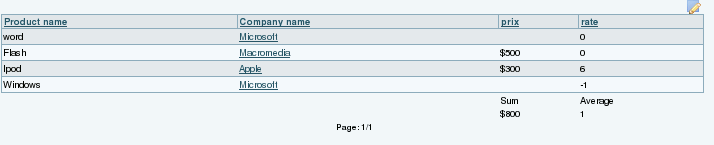
If you want to use sum and average on the same field use compute=146/sum:146/avg
Decimals in values are indicated with the dot (".") and not with the comma (",").
If your tracker has a field named 'page' and if the url contains the param 'page', TRACKERLIST will automatically filter the items that have the value of the page url param equal to the page item filed value.
With the parameter
calendarfielddate , you can display the list of the items in a calendar view. See Module calendar_new. The plugin collects all the items of the period and displays in a popup the items. The display is either the pretty tracker template specified by the param wiki or the value of main field.The calendarfieldate can contain either a single date field or 2 date fields.
Example:
Has been produced by a user module containing the code:
__Formations à venir__
{trackerlist trackerId="11" ignoreRequestItemId="y" fields="56:58" url="formation&itemId" showlinks="y" filterfield="56" exactvalue="greaterequal(now)" calendarfielddate="56" calendarviewmode="month" calendarstickypopup="y" wiki="trackerCalendrierFormation" calendarviewnavbar="n" wiki="trackerFormationCalendrier" calendarviewnavbar="partial"}
{trackerlist trackerId="11" ignoreRequestItemId="y" fields="56:58" url="formation&itemId" showlinks="y" filterfield="56" exactvalue="greaterequal(now)" calendarfielddate="56" calendarviewmode="month" calendarstickypopup="y" wiki="trackerCalendrierFormation" calendarviewnavbar="n" calendardelta="month" wiki="trackerFormationCalendrier"}
Examples
Sorting, filtering and pagination
Beginning with Tiki12, tablesorter parameters have been added (see the tablesorter tab in the parameter list above) to allow the user to sort, filter and paginate through the trackerlist results. Below is an example.
This code:
{trackerlist trackerId="8" fields="111:112:113" showlinks="y" showpagination="y" more="n" server="n" sortable="type:reset" sortList="[0,1],[2,0]" tspaginate="max:10" tsfilters="type:text;placeholder:Type a digit...|type:text;placeholder:Type to filter...|type:dropdown|type:date" tsortcolumns="type:digit;group:number-3|type:text|type:text;group:word-3|type:isoDate;group:date-month"}
Would show the following on this site:
Priority | Summary | Problem Type | LastModif |
|---|---|---|---|
| NaN - NaN (10) | |||
Some notes:
- Sort the columns to see automatic group headers for all but the second column
- Only one column can be sorted with the
sortListparameter if theserverparameter is set toy, otherwise multiple columns may be set - The
tsortcolumnsparameter determines the group headings and also helps the program to know what type of data is being sorted so that sorting is more accurate - The drop down in the third column is automatically generated. Automatic dropdowns can only be generated in these cases:
- The
serverparameter is not set toy, or - The field is a tracker type "dropdown" where the dropdown options have been specified in the tracker field definition
- The
- As you scroll down the page, the table header rows will always be visible as long as the table is visible
- the date filter from and to dates are customizable as is the date format
- Setting server to y would allow for only the visible rows to be fetched from the database
- To sort or filter a status field, you must set
server="y"(and thus use ajax)
How to filter a tracker function of a field in a user tracker.
For instance, you have a user tracker with a field Town, you have another tracker listing all the bakeries. This tracker has also a field Town. You want to display all the bakeries in the town of your user. For this you can use
{trackerlist trackerId="5" fields="21:23:24" filterfield="20" exactvalue="field(38,user,7)"}
where 5 is the trackerId of the bakery, 20 is the fieldId of Town in the tracker bakery, 38 is the fieldId of the Town in the user tracker 7.
You can use as many filters you want. For instance, you can filter on the Town and the nationality with the type of bakery...
With the same principle, you can display all the items of the user tracker that have the same Town than the user. or the same Town and same age that the user.
How to make columns larger via CSS
While hardcoding values is possible, this is a "last resort" solution. It will broke the mobile compatibility and it is a bad practice to use the Custom CSS for such adjustment. It is better to use the plugin list and create exactly what you want.
Add.field2 { width: 500px;}
Related
See also:
- To add data to the tracker via a form in a wiki page: PluginTracker
- To create a report in a wiki page: PluginTrackerFilter, PluginTrackerItemField, PluginTrackerStat
- And also PluginVote
- Pretty Tracker
- PluginList
- PluginTracker
- PluginR uses PluginTrackerList to use data from trackers within R scripts.