Tiki 3
Tiki 3 is now available for download from Sourceforge. Tiki 3.1, 3.2, etc. are bugfix releases of Tiki 3.0. And Tiki 3.x has been chosen as Long Term Support.
You can download and try Tiki in your own server, or through a TikiLiveCD, and see how to upgrade your system whenever it's released as stable: Upgrade 2.x to 3.x. It requires Mysql 4.1+ and PHP 5 (see full list of requirements). Changelog (2.5 Mb!)
Tiki3 was released on May 19, 2009
What's new?

(alphabetically sorted).
Alert
Send a message to users or a group about an action you are doing: alert
1.1.2. Blogs: comments moderation
Comments moderation has been added in Blogs.
1.1.3. Button improvements
Buttons are now more consistent. And some useless buttons like "list forums" when there is only one forum are not displayed nowadays.
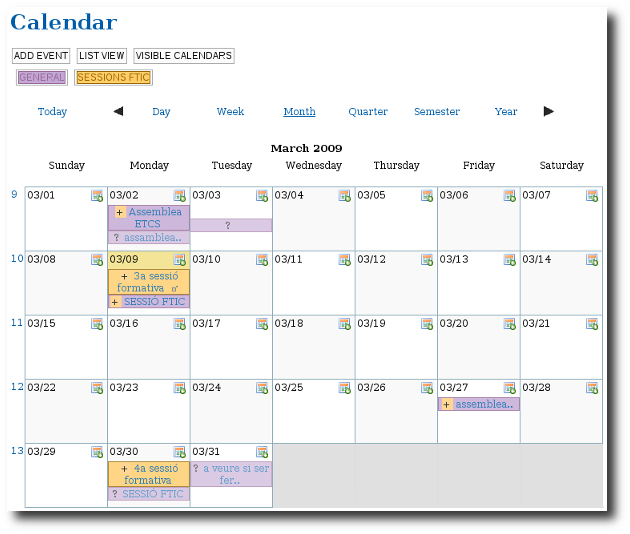
1.1.4. Calendar improvements
1.1.4.1. Default visible calendars
Some calendars can be set by the admin as visible by default for new users. Each user has still the chance to re-set which calendars he/she wants to be shown for him/her.
Also keep in database the user last calendar choices in order to keep use the same filter when he comes back.
1.1.4.2. Export to iCal
This has been requested for a long time and will be most useful to interact with other systems.
1.1.4.3. Recurring events
New recurrence feature to have the same event each week/month/year between two dates or for X occurrences. An event from an occurrence can be modified later. When modifying an event from a recurrence, Tiki will ask the user if he wants to change only the current event, all the events of the recurrence, or events of the recurrence which were not already modified.
1.1.4.4. New look of calendars in every views
New look of calendars in every views, especially in week view which is now displayed with hours details. Events on multiple days are also better displayed. In week view, when there is more than 3 events, a special zone will be displayed and the overbox will contain all details.
1.1.4.5. New "standard colors" for each calendar
New "standard colors" when creating a calendar to ease the choice of calendar colors.
1.1.5. Comments moderation and locking
Nowadays, Comments can be queued and an admin or moderator can decide whether approving them or not.
Comments moderation has been added also in Blogs.
1.1.6. Easier post-install database update
Database can be upgraded through an easier process, through web interface.
1.1.7. Easier directories backup
You can select, from "Admin system", which directories you want to save in a zipped backup file.
1.1.8. File Gallery improvements
1.1.8.1. File Gallery to produce image galleries
File galleries have been improved in a way that they can handle images also, and act de facto as image galleries, or podcast galleries, etc., with added features on them. This is to end up in newer tiki releases reducing code duplication between file galleries and image galleries, and users confusion on where to save and find files (whatever type they are). In the same way, in later Tiki releases, file galleries might also handle file attachments to wiki pages, ...
1.1.8.2. File Gallery diaporama
Improved file gallery diaporama.
Moreover, File galleries are closer to replace image galleries, since they include most (if not all) the previous functonality from image galleries, and benefit from the improvements in the file galleries.
Examples:
1.1.8.3. New file types recognized by Tiki
New file type icons have been added to file galleries in order to recognize and visualize them accordingly. They include: .7z, .flv, .mp4, .odg, odp, .ods, .odt, .ogm, .ogv, .svg.
1.1.9. Group watches
You can now assign a group to receive notification emails of changes. Great for project management! See Group Watches for more information.
1.1.10. Images:
Images can now be displayed with a nice "reflection" effect through the jquery plugin "reflect" (JQuery needs to be enabled).
Image galleries, on the contrary, haven't been improved much and will probably become deprecated in further releases, since file galleries have been enhanced to support the features for them, plus some more, and thus, reducing code duplication. See the section about "File Gallery Improvements".
1.1.11. Installer: much easier and user friendly
Installation process has been restructured, in clearer steps, as well as allowing to set the installation interface in your own language (provided that someone - like you? ;-) - has translated the interface beforehand in language.php.
1.1.12. Interface redesign
Some parts of the editing interface are in process of redesign, and will be included in 3.0 (while others are planned for version 4.0)
See the work in progress at http://ui.tiki.org
1.1.13. JQuery added
JQuery has been added as an optional javascript framework, which allows many user interface enhancements and nice effects on several parts of Tiki. Starting in version 4.0, it will be the official, always on, javascript framework.
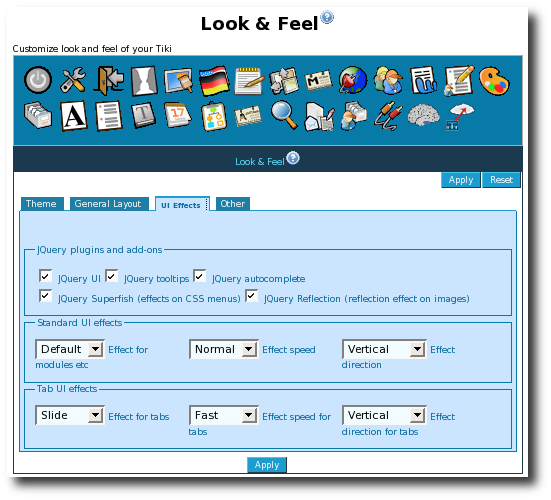
It can be enabled through "Admin > Features", and its options through "Admin > Look and Feel > UI Effects"
1.1.14. Layout improvements
Layout improvements will make themes and CSS easier to make, as well as improving layout consistency over different features. Pagination is now more consistent and only appears if there is more than one page of content. (no more page 0/1 or 1/1)
1.1.15. Mindmap
Generate a MindMap in Flash from the relationships between your wiki pages.
1.1.16. Morcego
See Wiki 3D below.
1.1.17. Plugins
Wiki-plugins can now be edited in a more user-friendly way. See Wiki Help revamped
1.1.17.1. Plugin Manager
Plugins can now be enabled or disabled on a sitewide basis by an admin
1.1.17.2. Plugin Approval
The usage of potentially dangerous plugins need to be validated in a case by case basis. An admin can do that through tiki-plugins.php
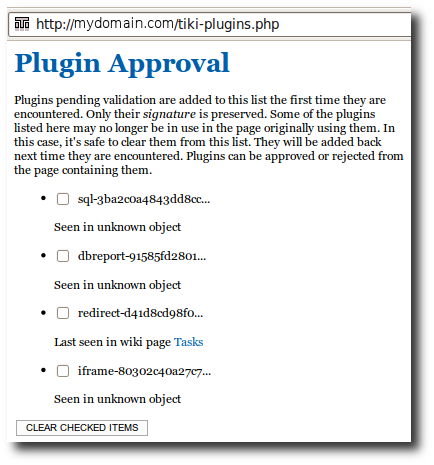
Then, if you go to one of those pages listed in the previous list, you'll find a box with the option to see the details to that plugin usage. Users with the required permissions will be able to preview and validate or reject them.
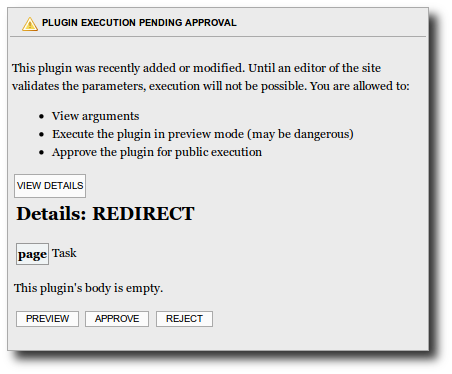
The permissions involved are:
| Permission | Description |
| tiki_p_plugin_approve | Can approve plugin execution |
| tiki_p_plugin_preview | Can execute unapproved plugin |
| tiki_p_plugin_viewdetail | Can view unapproved plugin details |
1.1.17.3. New Plugins added
Moreover, new Plugins have been added. See some of them:
- PluginAnnotation
Displays an image and allow the users to define zones to highlight information on the image. - PluginIframe
to get the content from an external url inside a wiki page - PluginInvite
to allow a user to invite an already existing user or a new user in some of his/her groups - PluginMediaPlayer
to play audio o video files from external or internal sources - PluginMWTable
Displays a table using MediaWiki syntax - PluginMySpace
Displays a SWF myspace mp3 playlist on the wiki page - PluginProposal
Provides a widget for users to vote on a proposal and view the current decision. - PluginTrackerTimeline
Timeline view of a tracker, can be used to display event schedules or gantt charts.
1.1.18. Profile manager
A system to make it easy to share & improve on installation & configuration profiles (through tiki-admin.php?page=profiles). They are installed from http://profiles.tiki.org or a base profile can be installed from the installation package itself if no connection to Internet available.
You can use them at installation time, or later to enable specific bunch of features in a single go through the profile manager (tiki-admin.php?page=profiles), instead of manually enabling many settings for that (i.e., make your site multilingual easily).
1.1.19. Reorganized Admin Panels
The admin panels have been massively re-organized to be more intuitive.
- Show only sub-features when relevant higher-level feature is activated
- New nicer layout
- More icons & tips
1.1.20. Search improved
If you are using mysql as the database behind your tikiwiki installation, you can user the Module search_box, which allows advanced searches, like BOOLEAN searches and many other improvements of the search feature, using a simple syntax:
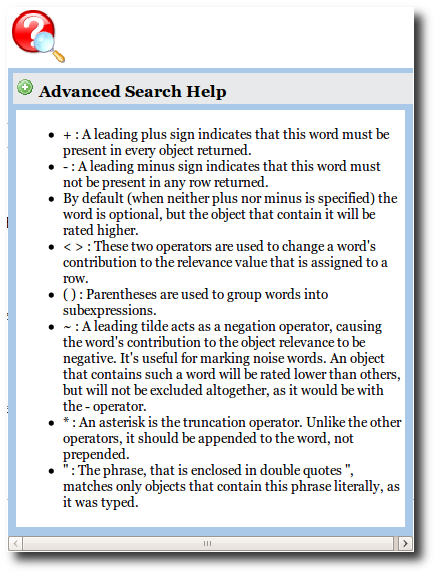
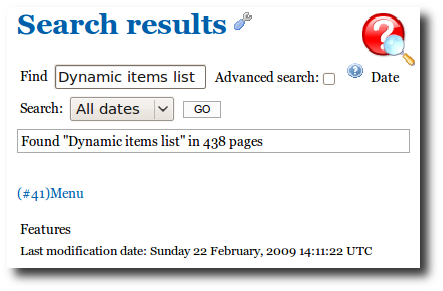
Example: you can search for "Dynamic items list" in the search box, without double quotes, and you'll find hundreds of objects containing some or all of the words.
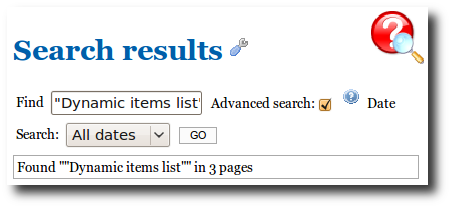
If you click on the advanced search checkbox, and surround your words by double quotes, you'll geet a very narrow result, with the page containing the three words on its name in that list:
1.1.21. Semantic Wiki links
semantic links to establish relationships between wiki pages (alias, related-to, synonym, etc.)
1.1.22. Select monitoring wiki pages at edit time
Nowadays, a user can select to monitor a wiki page through a checkbox at edition time, and not necessarily as a second step once the page is saved.
1.1.23. setup.sh script simplified
When you have SSH access to your server, the script to create the needed folders on the server and setting the right permissions on them (setup.sh) has been simplified so that it can be called with no arguments, since they will be discovered, if possible, or asked to the user one by one.
1.1.24. Spreadsheets or wysiwyg tables: easier to add in wiki pages
Sheets (Spreadsheets), which can be used also to add wysiwyg tables, are much easily added to wiki pages.
Just add a call to {sheet} (with no id defined) within any wiki page. Once saved, you'll be provided a button to "create a new sheet", and then, you'll be able to click on the usual "edit sheet" link, which will direct you to a new sheet (with the correct new id associated to it) in edit mode. From there, eveything follows as usual: add as many rows and columns as needed, add content, and save changes.
1.1.25. Survey
New survey question type using images in a file gal
1.1.26. Themes
New themes have been added. Like Strasa (strasa.css) and Coelesce (coelesce.css):
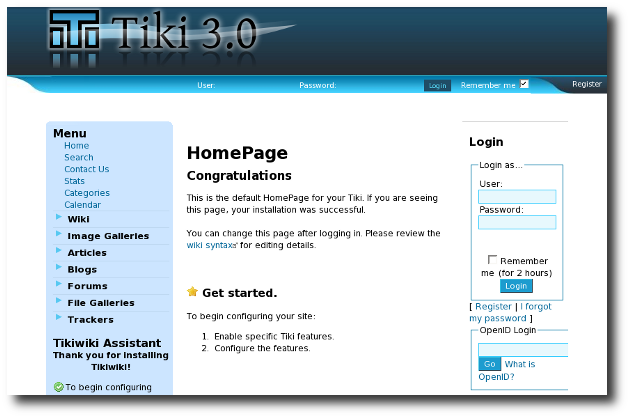
Users can also put their custom CSS specifications now in file such as styles/strasa/custom.css which will allow them easily override the specified theme CSS and add their own stuff or create new "theme options" (e.g. different color variation of a theme" which user can then choose and apply via dropdown box.
Go to themes.tiki.org for more information about themes for Tiki 3.
1.1.27. Tiki Remote Instance Manager (TRIM)
The Tiki Remote Instance Manager is
- A combination of shell and PHP scripts to install, update, backup and monitor (check security of) a large number of Tiki installations (instances).
- TRIM facilitates/automates the operations you would normally do by logging into each server.
- A great tool if you want to setup a WikiFarm
Please see:TRIM
1.1.28. Wiki Footnotes
Footnotes can be added to wiki pages, in a similar way to what other wiki engines do.
1.1.29. Wiki 3D browser improved
Wiki 3D browser has been fixed (was not working under certain scenarios with Tiki 2) and upgraded with the latest verion of its engine, Morcego, on current Tiki 3 release.
1.1.30. Wiki Help revamped
The Wiki Help has been revamped so that it is offered on the side as a red balloon with a lens on top. When you click on it, it allows you to select the Wiki help or Plugin help, once you click on any of the green + signs on their left.
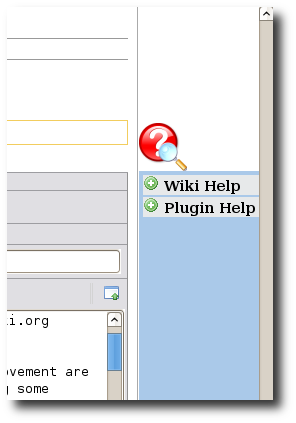
For instance, if you click on the  icon next to Plugin Help, you'll be shown the new edit help, where you can scroll on the side independently of the scroll of the wiki page, and click on the "Insert" link next to any plugin title.
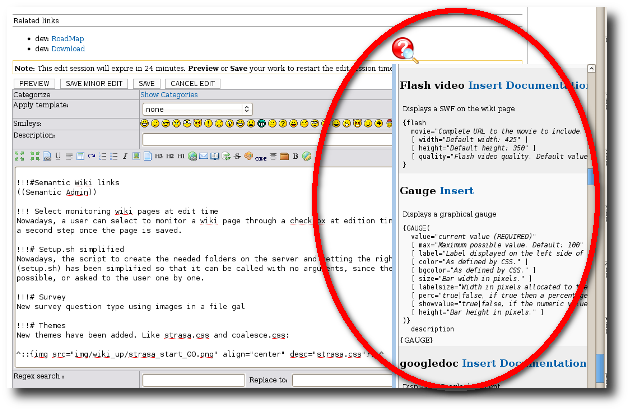
Descriptions and possible parameters for plugins are shown in a clearer way.
Later on, once saved, those plugin call can be edited in a quicker and more user friendly way, through the new plugin edit feature:
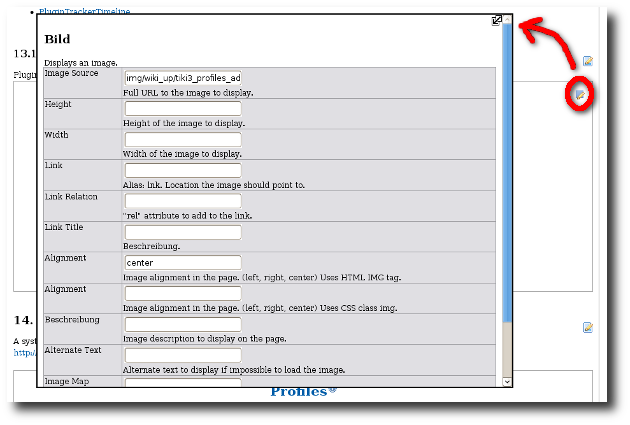
1.1.31. Wiki section edition in non-Wysiwyg mode
Wiki pages can be edited by section in non-Wysiwyg mode
1.1.32. XHTML improved
Better XHTML conformance
1.1.33. XML Import/Export of Wiki content
It is possible to import/or export a list of pages or a structure in an XML format
Each page can be exported with:
- its history
- its comments
- its attached files
- its images
For more information, see: XML Import/Export
1.1.34. Web Services
See Web Services. Related: Plugin Alias, and Profiles: Webservice Handler
1.1.35. Zend Framework
The Tiki community has picked Zend Framework as the main framework. In version 3.0, only some small parts are used. However, over time, more & more parts of Zend will be used.
1.1.36. Other notes
Here are other notes, which have less detail, and no screenshot.
- tableless layout
- homogenisation buttons, navbar, pagination, find box ..
- icon deployment to have a homogeneous display + be able to overload the icons in each theme
- ajax deployed
- ajax autosave
- plugin upcoming_events: new params: showDescription, showEnd, showColor
- groupofalert
- calendar: improve usability when adding an event in another calendar
- plugin sharethis
- perm to export trackers
- plugin trackerlist: new param export
- pref for login pattern
- calendar allday event
- improvement in poll: vote, possible re-vote, show voting user, allow vote changing
- improvement in survey: new question type 'Multiple choices of thumbnails from a file gallery' ('g') to be able to make a multiple choice question using thumbnails from a file gallery (e.g. for voting the best 3 images of a gallery, ...), new checkbox to specify if a question is mandatory, new params to specify, for multiple choices questions, the minimum and maximum number of required answers (+ error message when needed),
- can display category in image gallery
- sub style
- banner: maxCLicks
- faster alternative database interface to adodb: pdo
- usability: help button
- plugin banner working with IE6
- plugin last_blog_posts module: option nodate
- plugin survey
- module month links
- plugin last_articles: date_min, date_max
- last_blog_posts: date_min, daet_max
- fix import tracker with reserved name field
- file gallery: index also the filename
- allow 2 tracker items to have an attached file with the same name
- file gallery
- trim
- wikiplugin: setting to be able to use or not a plugin, setting to need or not an admin validation each time editing a plugin. Inline/UI editor
- profile
- <me
ta name="generator" content="TikiWiki CMS/Groupware - http://TikiWiki.org" /> - plugin snarf improvment
- show forum and tracker outbounds in admin notif panel
- menupage: param title
- new 'tiki_p_trust_input' perm to bypass the security checks (varcheck and sanitizer)
- smarty working in secure mode
- mysql search: display also the parent fgal
- can display also last comment user/date in tiki-view_tracker
- status in popup calendar
- boolean search in mysql search
- sql log page for adodb
- sefurl: sefurl for a trackeritem: ex: item34
- feature comment validation: http://doc.tiki.org/Comment Admin
- googleanalytics plugin
- trackerstat: additional option to link to tiki-view_tracker with the associated filter
- userlist module: params to link the username to user pref or user info or user page
- plugin back
- magic
- improvment in webmail
- be able to send a mail to a list of users in admin->users
- webservice http://dev.tiki.org/WebservicePlugin
- Export page list as web services
- button to download the checked files in fgal in a zip
- plugin ftp http://doc.tiki.org/PluginFtp
- plugin trackertimeline(can be used to display event schedules or gantt charts)
- plugin Google docs
- Allow to display multiple languages in a single page??? (14757)
- some calendar add event UI improvment
- special little css overloading (ex: styles/my_styles/css/calendar.css)
- tracker description parseable
- calendar: default event status on calendar basis
- translation
- page selector field type
- deployment and improvement of sefurl
- flexible layout for radio buttons in tracker
- categories collector to be able the current object categories in the templates
- security and parameter filtering
- better support when changing regular editor / wysiwyg editor
- better css menus display
- calendar: reccurrent event + better ergonomy to add an event + color of a calendar propagated +optional status
- better supoprt for non javascript browser
- plugin alias
- share email in webmain for group + flgas optional enad more useable + improvment in webmail + new permissions
- freetag respect permission
- new themes
- better handling of default site language for a user
- be able to download a zip a files in file galleries
- trim
- be able to send a mail to a list of users
- optional comma separated plugin parameters
- move special wiki syntax {} to plugin
- plugin edit popup
- back plugin
- diverse tunings for the set of prefs on a default installation
- fix search on forum content
- wiki mind map
- better support for hosting like free.fr(where include path must be completely specified)
- fix tracker stat on category with status
- option in TRACKERSTAT to link to the tracker item
- edit structure: wiki pages dropdown contains all the the page
- semantic links http://doc.tiki.org/Semantic+Admin
- dev: RoadMap
- dev: Download
- doc: Upgrade & Upgrade 2.x to 3.x
- Previous version: Tiki2
- Next version: Tiki4
;)