Tiki supports search-engine friendly web addresses (SEFURLs or clean URLs), which are short versions of Tiki URLs, thanks to Apache Rewrite Rules. Some search engine crawlers do not process links with trailing parameters, so transforming the syntax makes the URL more search-engine friendly. By configuring your server properly, Tiki can understand clean URLs so that such short URLs will bring up a Tiki page, and by configuring Tiki properly, Tiki will produce clean URLS and build them into menus, static links, etc. This page explains both steps: how to make Tiki understand and produce clean URLs. See also: htaccess
Examples
Here are some examples of how clean URLs work for various types of Tiki pages:
Note that both the short and long URLs will still access your site.
Steps to Activate Clean URLs
Activating input rewrite rules on your server (so Tiki can understand clean URLs)
This allows accessing your site with clean URL's
Enabling the SEFURL or SEFURL Filter (version 3.0) feature (or both) in Tiki (So Tiki will produce clean URLs)
You can do so at "Admin home/Control Panels > Search engine friendly url (tiki-admin.php?page=sefurl) > Activate the feature: "Search engine friendly URL"
This causes internal Tiki links to be rewritten into clean URLs. The generation of the clean URLs is governed with 'output rewrite rules' that are in the code before Tiki version 3.0 and in the database beginning with 3.0.
Uncomment SEF URL section of the robots.txt file (Optional) Tiki 16+
To do so, open the robots.txt located in the root directory of your tiki install, and remove the #'s in front of the SEF section.
This step will remove the basic URL's in search engine results in favour of the Clean URL's.
Step 1: Activate Input Rewrite Rules on Your Server
Web Hosting Service Using Apache
If you have Tiki version 1.9.x or greater and are using a web hosting service that uses Apache, then input rewrite rules can be activated as follows:
Rename the file named _htaccess in your Tiki root directory to .htaccess (or create a symbolic link to .htaccess).
This will automatically bring in suggested rewrite rules shown below (at Suggested Input Rewrite Rules ) into the .htaccess file. The _htaccess file is included as part of the Tiki download (since version 1.9.3) but is not activated by default because it may not work with all server configurations.
Apache Configuration When Managing Own Server
For better instructions on how to do this see Digital Ocean.
If you manage your server and are using Apache, be sure to
Load the rewrite module. Something like this line in httpd.conf: LoadModule rewrite_module modules/mod_rewrite.so (adjust the path if necessary). You can check it is ok if you see the mod_rewrite in the apache loaded modules (apachectl -M command).
Enable the access to .htaccess. To do so you must have lines like:
Adapt the directory path to your need. This block can be in httpd.conf or in your virtual host config (vhosts.d directory in apache2).
The documentation for Apache2 core says that the <FilesMatch> section requires:
Copy to clipboard
AllowOverride All
Restart your server
Web Servers Other Than Apache
If you or your web hosting company is using a web server other than Apache (IIS for example), see your server manual or contact your web hosting service to find out how to activate rewrite rules on your server.
Suggested Input Rewrite Rules
Below are the rewrite rules for different versions of Tiki that pull into the .htaccess file automatically when the steps above for Apache web servers are followed.
# These are suggested Rewrite Rules for use with Tiki.
# They enhance security and permit short URLS.
#
# To use
# 1- rename _htaccess to .htaccess
# or
# 2- add the content of this file to your httpd.conf
#
# Please find more info here
# http://doc.tiki.org/Rewrite+Rules
#

<FilesMatch "\.(bak|inc|lib|sh|tpl|sql)$">
	order deny,allow
	deny from all
</FilesMatch>

<IfModule mod_rewrite.c>
	RewriteEngine On

	# rewrite for multitiki sites, when configured as symlinks, not as apache aliases
	RewriteCond %{SCRIPT_FILENAME}/ -d
	RewriteRule [^/]$ %{REQUEST_URI}/ [R=301,L]

	# direct one-word access for tiki in /subdir1/
	RewriteRule	^articles$             /subdir1/tiki-view_articles.php                   [L]
	RewriteRule	^blogs$                /subdir1/tiki-list_blogs.php                      [L]
	RewriteRule     ^calendar$             /subdir1/tiki-calendar.php                        [L]
	RewriteRule	^categories$           /subdir1/tiki-browse_categories.php               [L]
	RewriteRule	^charts$               /subdir1/tiki-list_charts.php                     [L]
	RewriteRule	^chat$                 /subdir1/tiki-chat.php                            [L]
	RewriteRule	^contact$              /subdir1/tiki-contact.php                         [L]
	RewriteRule	^directories$          /subdir1/tiki-directory_browse.php                [L]
	RewriteRule	^eph$                  /subdir1/tiki-eph.php                             [L]
	RewriteRule	^faqs$                 /subdir1/tiki-list_faqs.php                       [L]
	RewriteRule	^files$                /subdir1/tiki-file_galleries.php                  [L]
	RewriteRule	^forums$               /subdir1/tiki-forums.php                          [L]
	RewriteRule	^images$               /subdir1/tiki-galleries.php                       [L]
	RewriteRule	^irc$                  /subdir1/tiki-irc_logs.php                        [L]
	RewriteRule	^galleries$            /subdir1/tiki-galleries.php                       [L]
	RewriteRule	^games$                /subdir1/tiki-list_games.php                      [L]
	RewriteRule     ^login$                /subdir1/tiki-login.php                           [L]
	RewriteRule     ^mobile$               /subdir1/tiki-mobile.php                          [L]
	RewriteRule	^my$                   /subdir1/tiki-my_tiki.php                         [L]
	RewriteRule	^newsletters$          /subdir1/tiki-newsletters.php                     [L]
	RewriteRule	^quizzes$              /subdir1/tiki-list_quizzes.php                    [L]
	RewriteRule	^sheets$               /subdir1/tiki-sheets.php                          [L]
	RewriteRule	^stats$                /subdir1/tiki-stats.php                           [L]
	RewriteRule	^surveys$              /subdir1/tiki-list_surveys.php                    [L]
	RewriteRule	^trackers$             /subdir1/tiki-list_trackers.php                   [L]
	RewriteRule     ^wml$                  /subdir1/tiki-mobile.php                          [L]
	RewriteRule	^workspaces$           /subdir1/tiki-workspaces_admin.php                [L]

	# direct one-word access for tiki in /subdir2/
	RewriteRule	^articles$             /subdir2/tiki-view_articles.php                   [L]
	RewriteRule	^blogs$                /subdir2/tiki-list_blogs.php                      [L]
	RewriteRule     ^calendar$             /subdir2/tiki-calendar.php                        [L]
	RewriteRule	^categories$           /subdir2/tiki-browse_categories.php               [L]
	RewriteRule	^charts$               /subdir2/tiki-list_charts.php                     [L]
	RewriteRule	^chat$                 /subdir2/tiki-chat.php                            [L]
	RewriteRule	^contact$              /subdir2/tiki-contact.php                         [L]
	RewriteRule	^directories$          /subdir2/tiki-directory_browse.php                [L]
	RewriteRule	^eph$                  /subdir2/tiki-eph.php                             [L]
	RewriteRule	^faqs$                 /subdir2/tiki-list_faqs.php                       [L]
	RewriteRule	^files$                /subdir2/tiki-file_galleries.php                  [L]
	RewriteRule	^forums$               /subdir2/tiki-forums.php                          [L]
	RewriteRule	^images$               /subdir2/tiki-galleries.php                       [L]
	RewriteRule	^irc$                  /subdir2/tiki-irc_logs.php                        [L]
	RewriteRule	^galleries$            /subdir2/tiki-galleries.php                       [L]
	RewriteRule	^games$                /subdir2/tiki-list_games.php                      [L]
	RewriteRule     ^login$                /subdir2/tiki-login.php                           [L]
	RewriteRule     ^mobile$               /subdir2/tiki-mobile.php                          [L]
	RewriteRule	^my$                   /subdir2/tiki-my_tiki.php                         [L]
	RewriteRule	^newsletters$          /subdir2/tiki-newsletters.php                     [L]
	RewriteRule	^quizzes$              /subdir2/tiki-list_quizzes.php                    [L]
	RewriteRule	^sheets$               /subdir2/tiki-sheets.php                          [L]
	RewriteRule	^stats$                /subdir2/tiki-stats.php                           [L]
	RewriteRule	^surveys$              /subdir2/tiki-list_surveys.php                    [L]
	RewriteRule	^trackers$             /subdir2/tiki-list_trackers.php                   [L]
	RewriteRule     ^wml$                  /subdir2/tiki-mobile.php                          [L]
	RewriteRule	^workspaces$           /subdir2/tiki-workspaces_admin.php                [L]


	# access any object by its numeric identifier for tiki in /subdir1/
	RewriteRule	^article([0-9]+)     /subdir1/tiki-read_article.php?articleId=$1       [QSA,L]
	RewriteRule	^art([0-9]+)         /subdir1/tiki-read_article.php?articleId=$1       [QSA,L]
	RewriteRule	^blog([0-9]+)        /subdir1/tiki-view_blog.php?blogId=$1             [QSA,L]
	RewriteRule     ^blogpost([0-9]+)    /subdir1/tiki-view_blog_post.php?postId=$1        [QSA,L]
	RewriteRule	^cat([0-9]+)         /subdir1/tiki-browse_categories.php?parentId=$1   [QSA,L]
	RewriteRule	^categ([0-9]+)       /subdir1/tiki-browse_categories.php?parentId=$1   [QSA,L]
	RewriteRule	^chart([0-9]+)       /subdir1/tiki-view_chart.php?chartId=$1           [QSA,L]
	RewriteRule	^directory([0-9]+)   /subdir1/tiki-directory_browse.php?parent=$1      [QSA,L]
	RewriteRule     ^dl([0-9]+)          /subdir1/tiki-download_file.php?fileId=$1         [QSA,L]
	RewriteRule	^eph([0-9]+)         /subdir1/tiki-directory_browse.php?parent=$1      [QSA,L]
	RewriteRule	^faq([0-9]+)         /subdir1/tiki-view_faq.php?faqId=$1               [QSA,L]
	RewriteRule	^file([0-9]+)        /subdir1/tiki-list_file_gallery.php?galleryId=$1  [QSA,L]
	RewriteRule	^forum([0-9]+)       /subdir1/tiki-view_forum.php?forumId=$1           [QSA,L]
	RewriteRule	^img([0-9]+)         /subdir1/show_image.php?id=$1                     [QSA,L]
	RewriteRule	^image([0-9]+)       /subdir1/tiki-browse_image.php?imageId=$1         [QSA,L]
	RewriteRule	^int([0-9]+)         /subdir1/tiki-integrator.php?repID=$1             [QSA,L]
	RewriteRule	^irc([0-9]+)         /subdir1/tiki-irc_logs.php?focus=$1               [QSA,L]
	RewriteRule	^gal([0-9]+)         /subdir1/tiki-browse_gallery.php?galleryId=$1     [QSA,L]
	RewriteRule	^gallery([0-9]+)     /subdir1/tiki-browse_gallery.php?galleryId=$1     [QSA,L]
	RewriteRule	^newsletter([0-9]+)  /subdir1/tiki-newsletters.php?nlId=$1             [QSA,L]
	RewriteRule	^page([0-9]+)        /subdir1/tiki-index.php?page_ref_id=$1             [QSA,L]
	RewriteRule     ^page-([A-Za-z0-9]+) /subdir1/tiki-index.php?page=$1                   [QSA,L]
	RewriteRule	^poll([0-9]+)        /subdir1/tiki-poll_results.php?pollId=$1          [QSA,L]
	RewriteRule	^quiz([0-9]+)        /subdir1/tiki-take_quiz.php?quizId=$1             [QSA,L]
	RewriteRule	^sheet([0-9]+)       /subdir1/tiki-view_sheets.php?sheetId=$1          [QSA,L]
	RewriteRule	^survey([0-9]+)      /subdir1/tiki-take_survey.php?surveyId=$1         [QSA,L]
	RewriteRule	^tracker([0-9]+)     /subdir1/tiki-view_tracker.php?trackerId=$1       [QSA,L]
	RewriteRule	^vote([0-9]+)        /subdir1/tiki-poll_form.php?pollId=$1             [QSA,L]
	RewriteRule     ^wiki-([A-Za-z0-9]+) /subdir1/tiki-index.php?page=$1                   [QSA,L]
	RewriteRule	^ws([0-9]+)          /subdir1/tiki-workspaces_desktop.php?workspaceId=$1    [QSA,L]

	# access any object by its numeric identifier for tiki in /subdir2/
	RewriteRule	^article([0-9]+)     /subdir2/tiki-read_article.php?articleId=$1       [QSA,L]
	RewriteRule	^art([0-9]+)         /subdir2/tiki-read_article.php?articleId=$1       [QSA,L]
	RewriteRule	^blog([0-9]+)        /subdir2/tiki-view_blog.php?blogId=$1             [QSA,L]
	RewriteRule     ^blogpost([0-9]+)    /subdir2/tiki-view_blog_post.php?postId=$1        [QSA,L]
	RewriteRule	^chart([0-9]+)       /subdir2/tiki-view_chart.php?chartId=$1           [QSA,L]
	RewriteRule	^cat([0-9]+)         /subdir2/tiki-browse_categories.php?parentId=$1   [QSA,L]
	RewriteRule	^categ([0-9]+)       /subdir2/tiki-browse_categories.php?parentId=$1   [QSA,L]
	RewriteRule	^directory([0-9]+)   /subdir2/tiki-directory_browse.php?parent=$1      [QSA,L]
	RewriteRule     ^dl([0-9]+)          /subdir2/tiki-download_file.php?fileId=$1         [QSA,L]
	RewriteRule	^eph([0-9]+)         /subdir2/tiki-directory_browse.php?parent=$1      [QSA,L]
	RewriteRule	^faq([0-9]+)         /subdir2/tiki-view_faq.php?faqId=$1               [QSA,L]
	RewriteRule	^file([0-9]+)        /subdir2/tiki-list_file_gallery.php?galleryId=$1  [QSA,L]
	RewriteRule	^forum([0-9]+)       /subdir2/tiki-view_forum.php?forumId=$1           [QSA,L]
	RewriteRule	^img([0-9]+)         /subdir2/show_image.php?id=$1                     [QSA,L]
	RewriteRule	^image([0-9]+)       /subdir2/tiki-browse_image.php?imageId=$1         [QSA,L]
	RewriteRule	^int([0-9]+)         /subdir2/tiki-integrator.php?repID=$1             [QSA,L]
	RewriteRule	^irc([0-9]+)         /subdir2/tiki-irc_logs.php?focus=$1               [QSA,L]
	RewriteRule	^gal([0-9]+)         /subdir2/tiki-browse_gallery.php?galleryId=$1     [QSA,L]
	RewriteRule	^gallery([0-9]+)     /subdir2/tiki-browse_gallery.php?galleryId=$1     [QSA,L]
	RewriteRule	^newsletter([0-9]+)  /subdir2/tiki-newsletters.php?nlId=$1             [QSA,L]
	RewriteRule	^page([0-9]+)        /subdir2/tiki-index.php?page_ref_id=$1             [QSA,L]
	RewriteRule     ^page-([A-Za-z0-9]+) /subdir2/tiki-index.php?page=$1                   [QSA,L]
	RewriteRule	^poll([0-9]+)        /subdir2/tiki-poll_results.php?pollId=$1          [QSA,L]
	RewriteRule	^quiz([0-9]+)        /subdir2/tiki-take_quiz.php?quizId=$1             [QSA,L]
	RewriteRule	^sheet([0-9]+)       /subdir2/tiki-view_sheets.php?sheetId=$1          [QSA,L]
	RewriteRule	^survey([0-9]+)      /subdir2/tiki-take_survey.php?surveyId=$1         [QSA,L]
	RewriteRule	^tracker([0-9]+)     /subdir2/tiki-view_tracker.php?trackerId=$1       [QSA,L]
	RewriteRule	^vote([0-9]+)        /subdir2/tiki-poll_form.php?pollId=$1             [QSA,L]
	RewriteRule     ^wiki-([A-Za-z0-9]+) /subdir2/tiki-index.php?page=$1                   [QSA,L]
	RewriteRule	^ws([0-9]+)          /subdir2/tiki-workspaces_desktop.php?workspaceId=$1    [QSA,L]

	# todo add support for all characters allowed in a Wiki name for tiki in subdir1
	# make sure this is the last rule!
	RewriteRule	^show:(~?)([-_\+A-Za-z0-9]+)$  /subdir1/tiki-slideshow.php?page=$1$2   [QSA,L]
	RewriteRule	^(~?)([-_\+A-Za-z0-9]+)$    /subdir1/tiki-index.php?page=$1$2          [QSA,L]

	# todo add support for all characters allowed in a Wiki name for tiki in subdir2
	# make sure this is the last rule!
	RewriteRule	^show:(~?)([-_\+A-Za-z0-9]+)$  /subdir2/tiki-slideshow.php?page=$1$2   [QSA,L]
	RewriteRule	^(~?)([-_\+A-Za-z0-9]+)$    /subdir2/tiki-index.php?page=$1$2          [QSA,L]

	#for multi-byte char support use for tiki in subdir1
	RewriteRule     ^([^a-z]+)([^\/]+)([^tki-]+)(.*[^.js]+)(~?)(.*)$ /subdir1/tiki-index.php?page=$1$2$3$4$5$6$7$8$9 [QSA,L]

	#for multi-byte char support use for tiki in subdir2
	RewriteRule     ^([^a-z]+)([^\/]+)([^tki-]+)(.*[^.js]+)(~?)(.*)$ /subdir2/tiki-index.php?page=$1$2$3$4$5$6$7$8$9 [QSA,L]

</IfModule>
Step 2: Configure Tiki to Produce Clean URLs
Now that your input rewrite rules have been set, you now need to configure Tiki to activate the output rewrite rules so that Tiki will generate SEFURLs internally in menus, static links and elsewhere.
Starting with version 3.0, there is a search engine friendly feature icon directly on the Admin Home page that will look something like this:
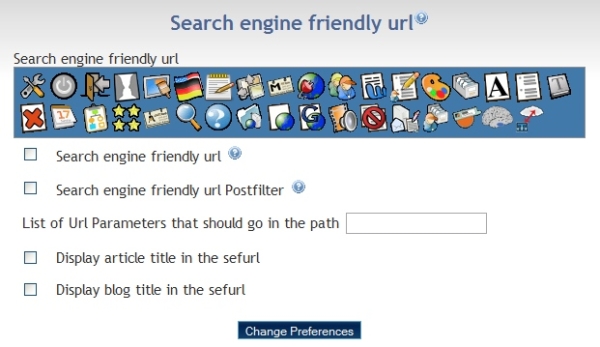
Clicking on that icon will bring up the search-engine friendly url admin page (although you could reach this page through the paths described above for previous versions as well):
Search engine friendly url Selecting the first checkbox will activate the SEFURL feature within Tiki, meaning that some links used in and elsewhere in Tiki will be search-engine friendly. This doesn't work for all links because not all of the templates have been updated, that's why there is a second checkbox...
Search engine friendly url Postfilter To generate SEFURLs for all Tiki links, also check the second checkbox which creates short URLs by filtering the output. The SEFURL Postfilter consumes more processor (CPU) time than the non-filter version (it deals with all the text and it deals also with cached text like modules while the 'on the fly' filter does not do it. In future versions the SEFURL Postfilter will not be used - it is only necessary until the template SEFURL work is finished. Either one or both features (SEFURL and SEFURL Postfilter) may be used.
List of Url Parameters that should go in the path This is used if you want a post or get variable to be represented in the sefurl. For instance if you have a url like tw.org/tiki-index.php?page=xxx&lang=en and if you put lang in the setting, the sefurl will be tw.org/en/xxx. You can generalize to any number of parameters. For a setting lang,locale, an url tw.org/tiki-index.php?page=xxx&lang=en&locale=us, the sefurl will be tw.org/en/us/xxx. This setting requires you adapt your .htaccess.
Display article title in the sefurl Clicking this checkbox will add the title of the article to the url for a link to that article. For instance, tiki-read_article.php?articleId=1 will be transformed into article1-My-article-title. This does not work with the postfilter, only with 'on the fly filter'.
Display blog title in the sefurl Similar to the article checkbox, clicking this checkbox will add the title of the blog to the url for a link to that blog. This does not work with the postfilter, only with 'on the fly filter'.
Within Tiki,
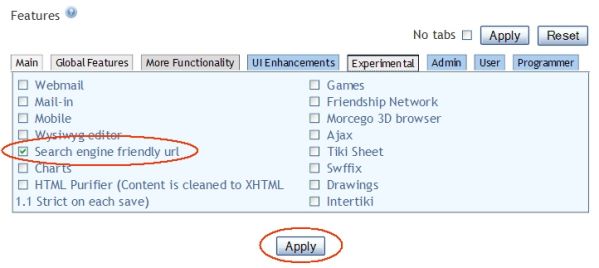
Go to Admin Home -> Features -> Experimental -> Search engine friendly url (checkbox) + Or use the following URL to get to the Features page (since version 2.0): your URL/tiki-admin.php?page=features
Check the box for "Search engine friendly url" to select this feature
Click "Apply" to activate the feature
Here's a screenshot:
Step 3: Configure Tiki to Show Clean URLs in Search Engine Results
As of Tiki16 or greater, you may optionally remove the basic urls from search engine results. This will cause your Clean URL's to show by default in any search engine that uses a robots.txt file (including Google).
When Clean URL's are enabled, it creates a second set of Clean URL's. The original URL's still exist, and by default, search engines will crawl and index them. Removing "duplicate content" is considered to be a good SEO practise and failing to do so generally results in a mild ranking penalty.
To enable this option, open the robots.txt file in your Tiki root directory and uncomment the SEF section by removing the #'s that start new lines. Uncommenting these lines without first completing steps 1 & 2 will prevent your website from being crawled or indexed.
Changing Rewrite Rules
You can customize the rewrite rules but it is important to note that that the input and output rewrite rules are connected, so that if you change one you may need to change the other.
You can add as many input rewrite rules you want. For instance if you want to be able to access a forum with forum1 or forum_1, no problem. Add the adequate rule in the htaccess that will rewrite forum_1 to tiki-view_forum.php?forumId=1
But if you want to change the output "rewrite" rules in Tiki, you must adapt the input rewrite rules
Starting with Tiki version 3.0, the output rewrite rules are in the table tiki_sefurl_regex_out
Developer's Corner
The 'on the fly' filter can use 2 smarty tools: prefilter and a function. Here's an example:
On this #tikiexpresstutorial, using #tiki19 I’ll show you:
How to enable a feature from the Control Panels
How to enable a Global Feature from the features panel
How to enable an Interface feature
A quick overview of the Programmer features
And where to look for feature options

;)