Article Administration
- Overview
- Use this page to configure the Tiki Articles feature.
- To access
- Click the Articles icon on the Admin Panel
or Access http://example.org/tiki-admin.php?page=articles
- Note
- The Articles feature may also be referred to as CMS in Tiki admin areas and documentation.
Articles
To differentiate CMS articles from wiki pages, articles are typically not extensively modified after having been published. They have several of their own attributes, including "publish date". They are typically time-sensitive and so are arranged according to the publish date and time.
See also Multilingual Article.
Three important aspects of the Articles feature are: Articles per se, Topics, and Submissions.
- Articles - The actual content items that are displayed, commented on, etc.
- Topics - Each article is designated under a single topic. Topics can be created as needed by the site. You can also assign multiple categories to each article for additional organizational flexibility.
- Submissions - This feature enables article authors to submit an article to be approved by an authorized administrator. Of course new groups such as "Editor" or "Article author" can be created for these roles, or the relevant permissions can be assigned to existing groups.
Feature Overview
Topics
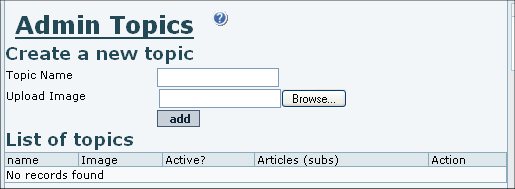
Articles and submissions are classified by topic. You can edit topics from the admin topics screen. You must create a topic before anyone can submit an article.
In this screen you can add and remove topics or you can activate/deactivate topics without removing them. You can also click the perms link to assign permissions to the topic.
Topic-related permissions work as follows:
- If no permission is assigned to the topic then everybody can read articles or reviews in this topic.
- If the tiki_p_read_topic permission is assigned for the topic only the groups with the permission can view the topic and other users won't see content in the topic (Articles, reviews,etc). This can be used to manage private topics that only users in some groups can read.
Note: Topics are not the same as Tiki categories. Topics are only for articles, whereas categories are for the full range of objects at a Tiki site.
In the menu, click on Admin Topics:
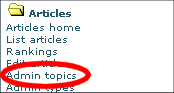
The admin topic panel allows you to set the config:
Article Types
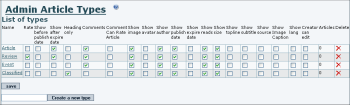
An article "type" defines the information components of an article. Details of an article type include:
- Does the article have an into top line, or information source link, or separate lead section?
- Can readers rate the article?
- Can visitors post comments?
- Does the article "expire" after a specific date?
- And more.
Image Captions Setting
The article "type" allows to enable optional custom captions for the individual articles that will make use of article image. (This is not regarding pictures in an article, but the image that is specified as the article image, such as a lead image.)
Just check the box and there you go.
That way, you do not get the same ALT text all the time and you can for example provide the credits for the picture.
By default there are four article types:
- Article - Normal type, only displays in "Article Home" after the publication date.
- Review - Articles with reader-added ratings. Only displays in "Article Home" after the publication date.
- Event - Used for showing upcoming events or to automatically remove content from your site. Events display until the "Publication/Event Date". Switching the type between article and event should cause it to appear and disappear from the Article Home page.
- Classified ad (advertisement listing)
You can change or delete these article types to match your need and you can create more articles types as needed.
In the menu, click on Admin Types.
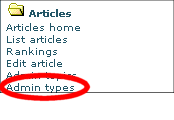
The admin type panel allows you to set the config
Edit page Advanced tab
Under this tab is a form with text inputs that can be used to display additional information with the article. These inputs are:
- Attach existing article ID as translation
- If the site is multilingual (that is, the i18n feature is activated) and an article has already been published that the new article is a translation of, then that article's ID can be entered here and a link to the article will be displayed.
- Topline
- Text entered here will display above the article title as a sort of teaser or introductory phrase or statement.
- Subtitle
- This text will display under the article title.
- Source
- A URL (web address) can be entered here as a link, for cases where that would be useful.
- Author rating
- Info coming soon.
- Attributes
- Custom attributes can be created on the Article Types page (tiki-article_types.php) for each article type. Then when creating an article, if a custom attribute is available for that type, a form input labelled as that custom attribute will display, and the text information for the attribute can be entered. The attribute name and information will be displayed at the top of the article text.
- To enable articles for your site, see General Admin.
- Article vs Blog comparison
;)