[Show/Hide Right Column]


noteNote
This page is to document what Tiki does. For feature requests and bug reports, please see corresponding page on dev site


Print

Shoutbox


The Shoutbox is a module that can be placed in either column of Tiki. It serves as an internal Instant Messaging service for the site. Shoutbox is used as a quick informal way for site participants to communicate with each other.

Adding a Shoutbox

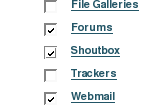
1. Enable the Shoutbox feature on the Administration:Features page by clicking on the checkbox and clicking the "Change Preferences" button at the bottom of the page to save your change.
Image
Figure 1. Enabling Shoutbox


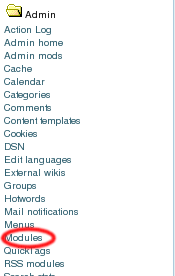
2. Select Module from the Admin Menu.
Image
"Figure 2. Selecting the module


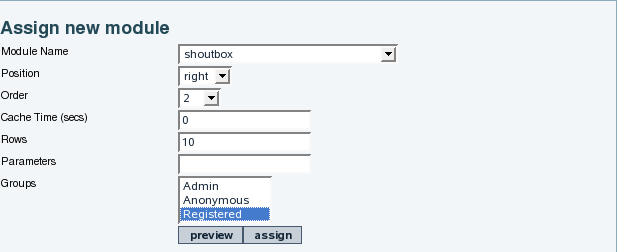
3. Add the Shoutbox module and assign the groups which can use it. In our example, we've limited use to the registered group. We've positioned it as the second item in the right column.
Image


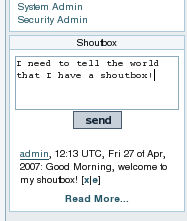
4. Your ShoutBox is now visible!
Image


Configuring the Shoutbox


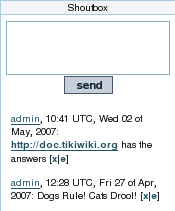
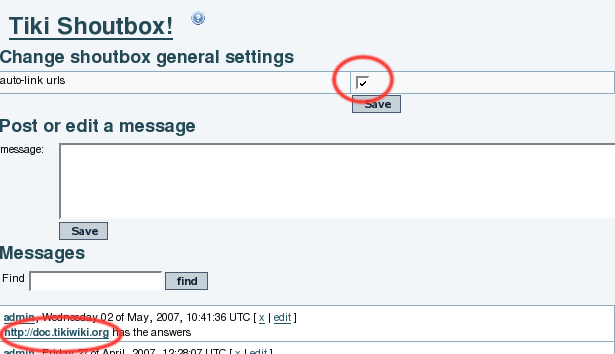
Click the checkbox at the top of the admin page to auto-link URL's. The screenshots below shows the checkbox and the effect when this option is enabled.
Image

Image


Note: If you enter a URL that contains a path to a specific file, it will be displayed in the shoutbox as "[Link], where [Link] is a clickable link to the URL you specified. For example if you enter "http://doc.tikiwiki.org/tiki-index.php", this will show up simply as "[Link]" in the shoutbox message compared with "http://doc.tikiwiki.org", which shows up as the full URL, as in the image above

Adding Banned Words


If there is certain language you do not want to see in the shoutbox, you can create a list of banned words. Select "Shoutbox Words" from the admin menu:

Image


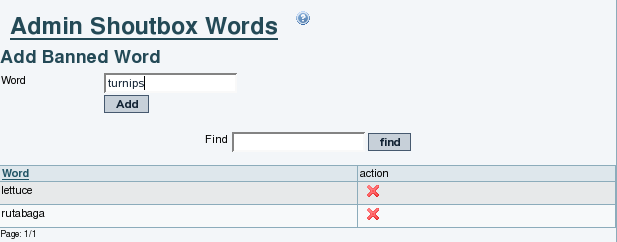
Then add the words you want to ban. In the example below we're banning some of our least favorite vegetables:
Image


If a user types in one of these words in his shoutbox message, the message will be discarded. It will not be displayed or saved.


Contributors to this page: Darren46 points  , system , Mose96 points  , mlpvolt1894 points  and dthacker1311 points  .
Page last modified on Thursday 24 July, 2008 13:51:50 UTC by Darren46 points .

Find by Page Name

Exact match

Keywords

The following is a list of keywords that should serve as hubs for navigation within the Tiki documentation and should correspond to development keywords (bug reports and feature requests):

Accessibility (WAI & 508)
Articles & Submissions
Backlinks
Banners
Batch
BigBlueButton audio/video/chat/screensharing (5.x)
Blog
Bookmark
Browser Compatibility
Link Cache
Calendar
Category
Chat
Clean URLs
Comments
Communication Center
Compression (gzip)
Contacts Address book
Contact us
Content template
Contribution 2.x
Cookie
Copyright
Custom Home (and Groups Home Page)
Date and Time
Debugger Console
Directory (of hyperlinks)
Documentation link from Tiki to doc.tikiwiki.org (Help System)
DogFood
Dynamic Content
Dynamic Variable
External Authentication
FAQ
Featured links
File Gallery
Forum
Friendship Network (Community)
Gmap Google maps
Groups
Hotword
HTML Page
i18n (Multilingual, l10n, Babelfish)
Image Gallery
Import-Export
Install
Integrator
Interaction
Inter-User Messages
InterTiki
Kaltura video editing
Karma
Live Support
Login
Logs (system & action)
Look and Feel
Lost edit protection
Mail-in
Map with Mapserver
Menu
Meta Tags
Mobile Tiki and Voice Tiki
Mods
Module
MultiTiki
MyTiki
Newsletter
Notepad
Payment
Performance Speed / Load
Permissions
Platform independence (Linux-Apache, Windows/IIS, Mac, BSD)
Polls
Profiles
Profile Manager
Quicktags
Quiz
Rating
Feeds
Score
Search engine optimization
Search
Security
Semantic links 3.x
Shadowbox
Shadow Layers
Shopping cart
Shoutbox
Slideshow
Smiley
Spam protection (Anti-bot CATPCHA)
Spellcheck
Spreadsheet
Stats
Surveys
Tags 2.x
Task
Tell a Friend, Alert + Social Bookmarking
TikiTests 2.x
Theme CSS & Smarty
Trackers
TRIM
User Administration including registration and banning
User Files
User Menu
Watch
WebHelp
WebDAV 5.x
Webmail
Webservices
Wiki 3D
Wiki History, page rename, etc
Wiki Page Staging and Approval 2.x
Wiki Plugin extends basic syntax
Wiki Syntax
Wiki structure (book and table of content)
Workspace
WYSIWYCA
WYSIWYG 2.x
XMLRPC