Estructuras
Las estructuras se usan para agrupar conjuntos arbitrarios de páginas wiki dentro de una arborescencia navegable. Resultan muy utiles para reunir paginas wiki en conjuntos de documentación, manuales, FAQs, HOwTos, etc.
Manejar estructuras
Clicando en "estructuras" situado en el sub-menu, eso le traera a una pagina con una lista de estructuras pre-establecidas, asi como maneras para crear nuevas estructuras. Esta opción del menu solo se desplegara si tiene usted el permiso "tiki_p_edit_structures"

Crear nuevas estructuras
La "estructura ID" es usada como el nombre de las estructuras root (raices) de una página wiki. Si la pagina wiki no existe, esta será generada al mismo tiempo que se crea la estructura.
El "alias" es un nombre alternativo para las estructuras roots de las paginas wiki. Si un alias existe, este sera usado de manera preferente dentro del nombre de la pagina wiki original. Esto resulta util para nombres comunes de paginas como "contenidos" o "introduccion".
El campo "arbol/arborescencia" permite el usuario proveerse de esqueletos de estructuras arborescentes. Cada linea de la arborescencia indica una pagina wiki relacionada en la estructura. Si la pagina wiki no existe se podra crear.
Para crear une estructura arborescente con juegos de sangría haz preceder el wikiname con espacios.
Para incluir un alias para el wikiname, ponle '-> alias delante el wikiname.
Un ejemplo de "arborescencia" sería parecido a este ejemplo:
"Ejemplo de arborescencia":
Wiki -> Introducción
 Usar Páginas Wiki
  Wiki Links
  Wiki Listas
  Wiki Imagenes
  Wiki Formatear texto
  Wiki Caracteres especiales
 Wiki Admin -> Administracion
Wiki Detalles
Editando una estructura existente
Selecciona una estructura dentro de la lista afín de poder abrir la página de "modificar estructuras". La forma arriba de la página te indica el nodo habitual.
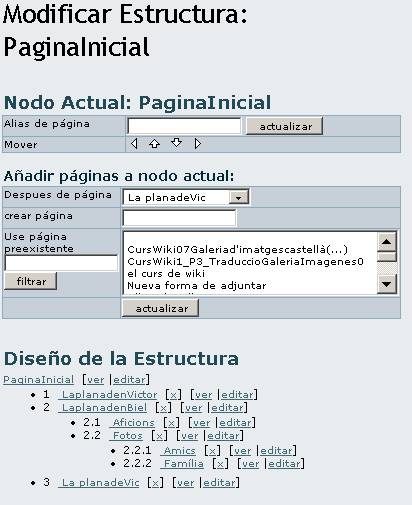
El nodo seleccionado por defecto es equivalente a la estructura "raiz/root" de la página. Selecciona una estructura nodo alternativa para poder editar desde la arborescencia de "disposición (layout) de estructura " ubicada arriba de la página.
Utiliza el boton de "actualizar" para añadir o actualizar los nodos actuales de la "página alias".
Utiliza los botones de navegacion para mover los nodos actuales en una posición diferente dentro de la "disposición de estructura". El nodo actual se vizualizara en negrita (chris.holman: el nodo raiz nunca se ve subrayado, puede ser que debería).
Añadir páginas al nodo actual:
Cualquiera pagina que añadas sera integrada como sub-pagina dentro del "nodo actual" y insertada depues de la pagina indicada por "pagina despues".
Si entras un wikiname dentro del campo de "pagina de creación", una nueva pagina con ese nombre sera creada. Si se vuelve "popular" este campo se vuelve preferente encima del campo de "uso de la pagina pre-existente". El campo de "uso de la pagina pre-existente" permite al usuario injertar una o más páginas existentes. El campo filtro puede ser usado para limitar la variedad de páginas existentes.
Pagínación de estructuras
La "paginación de estructuras" provee links y te permite:
Referenciar las páginas wiki: solo si se dispone de los permisos necesarios
Editar las paginas wiki referenciadas: solo si se dispone de los permisos necesarios
Mover de la estructura la referencia de la pagina: si clicas "x" para quitar una pagina, el sistema te pedira si quieres remover la pagina de la estructura o si la quieres quitar completamente.
Hay que notar que si la pagina que se mueve posee sub-paginas, entonces todas estas seran quitadas recurrentemente de la estructura (las paginas wiki subrayadas seran tambien quitadas si elijes la opción " quitar pagina también").
Estructuras de Navegación
Cuanda navegamos por el Wiki:
- Si una página es parte de una o mas estructuras, una subcategoria que contiene la palabra 'estructura... ' aparecerá en la parte superior de la página. Selecciona el nombre de la estructura de esta lista para activarlo.
- Si la página de wiki es la raiz de estructuras de la página de Wiki, la estructura se activará automáticamente.
Una vez que una estuctura es activa, las págines que pertenecen a la estructura se mustran con una barra de navegación.
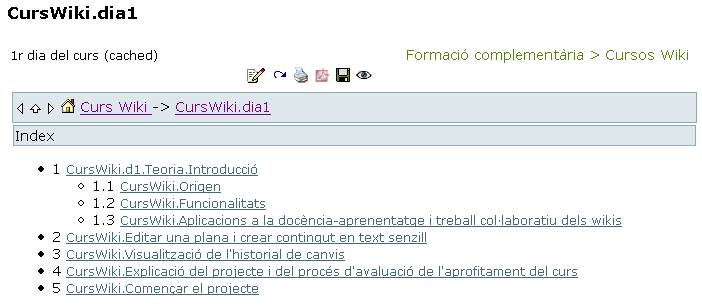
La barra de navegación proporciona iconos en la pagina siguiente, previa, asi como la pagina inicial de la estructura (home).
Tabla de contenidos (toc)
Usando la etiqueta (toc) en una pagina que pertenece a una estructura, esa accion enseñara una tabla de contenidos para algunas de las subpaginas contenidas en esa página. Afín de que esa accion funccione la pagina debe de contar con sub-paginas.
- Usado en la pagina "raiz" de estructuras eso crea un TOC lleno.
- Usado en una subpágina, eso crea un capitulo TOC.
Presentación en formato diapositivas
Si esta activada la opción a modo de presentación de diapositivas, seleccionando 'diapositivas' desde la barra de la pà gina te permitira ver la estructura de esa pà gina con una presentación en formato de diapositivas!
Creación de PDF
Si esta activada la opción de creación de pdf, seleccionando el icono 'pdf' te permitira ver una estructura de pagina bajo formato pdf (integrando las paginas del wiki que pertencen a esa estructura).
;)