Plugin Articles
Use this wiki plugin, available since Tiki1, to include any number of articles into a wiki page. For a plugin that includes components of a single article, see PluginArticle. This is particularly useful if you want to include the top 2 articles into your homepage, but being anyway able to write some custom Wiki text. For a quick summary of a list of articles you can also use PluginModule to display Module last_articles.
Parameters
Display multiple articlesIntroduced in Tiki 1.
Go to the source code
Preferences required: feature_articles, wikiplugin_articles
| Parameters | Accepted Values | Description | Default | Since |
|---|---|---|---|---|
urlparam |
text | 6.0 | ||
dateEnd |
date | Latest date to select articles from. (YYYY-MM-DD) |
5.0 | |
lang |
lang | List only articles in this language | 1 | |
max |
int | The number of articles to display in the list (use -1 to show all) |
50 | 1 |
periodQuantity |
digits | Numeric value to display only last articles published within a user defined time-frame. Used in conjunction with the next parameter "Period unit", this parameter indicates how many of those units are to be considered to define the time frame. If this parameter is set, "Start Date" and "End Date" are ignored. | 1 | |
periodUnit |
(blank) hour day week month |
Time unit used with "Period quantity" | 1 | |
dateStart |
date | Earliest date to select articles from. (YYYY-MM-DD) |
5.0 | |
start |
int | The article number that the list should start with (starts with first article by default). This will not work if Pagination is used. | 0 | 1 |
topic |
text | Filter the list of articles by topic. Example: !topic+topic+topic |
1 | |
containerClass |
Valid CSS class | CSS class to add to the containing "div.article" (default: "wikiplugin_articles") |
wikiplugin_articles | 1 |
largefirstimage |
(blank) y n |
If set to y (Yes), the first image will be displayed with the dimension used to
view of the article |
n | 6.0 |
translationOrphan |
alpha separator: | |
User- or pipe-separated list of two-letter language codes for additional languages to display. List pages with no language or with a missing translation in one of the language | 1 | |
overrideDates |
(blank) y n |
Whether to comply with the article type's "show before publish" and "show after expiration" settings (not complied with by default) | n | 1 |
quiet |
(blank) y n |
Whether to not report when there are no articles (no reporting by default) | n | 1 |
fullbody |
(blank) y n |
Whether to show the body of the articles instead of the heading (not set by default). | n | 5 |
actions |
(blank) y n |
Whether to show the buttons and links to do actions on each article (for the actions you have permission to do | n | 6.1 |
sort |
random or column names to add _asc _desc to: created, author, title, publishDate, expireDate, articleId, topline, subtitle, lang, linkto, authorName, topicId, topicName, state, size, heading, body, isfloat, useImage, image_name, image_caption, image_type, image_size, image_x, image_y, image_data, list_image_x, list_image_y, nbreads, votes, points, type, rating, ispublished | The column and order of the sort in columnName_asc or columnName_desc format.
Defaults to publishDate_desc (other column examples are title, lang, articleId,
authorName & topicName). Use "random" to have random items. |
publishDate_desc | 2.0 |
order |
digits separator: | |
List of ArticleId that must appear in this order if present | 9.0 | |
titleonly |
(blank) y n |
Whether to only show the title of the articles (not set to title only by default) | 1 | |
usePagination |
(blank) y n |
Activate pagination when the articles list is long. Default is n |
n | 1 |
useLinktoURL |
(blank) y n |
Use the external source URL as link for articles. | n | 1 |
categId |
digits separator: | |
List of category IDs, separated by "%0". Only articles in all these categories are listed | 1 | |
notArticleId |
digits separator: | |
List of article IDs to not display, separated by "%0" | 5.0 | |
articleId |
digits separator: | |
List of article IDs to display, separated by "|" |
9.0 | |
topicId |
Valid topic IDs | Filter the list of articles by topic ID. Example: !topicId+topicId+topicId |
2.0 | |
type |
Valid article types | Filter the list of articles by types. Example: !type+type+type |
1 |
Fields displayed with the articles (author, nb of views, etc.)
To choose which fields to display on top of each article, go to Control panels - Articles - Article Types and tick/untick the choosen field -see https://doc.tiki.org/Articles+Listing
Example
In this example below, a wiki page is shown including the articles plugin, so that last articles are shown below the "! News" heading of the page.
This code:
{articles max="5" topicId="!5"}
Produced:
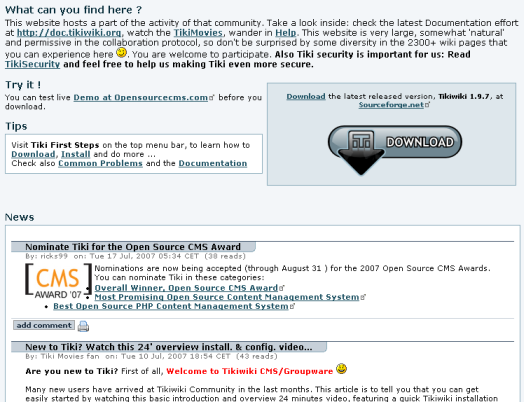
When topic="!New+Events', only the articles that have not a topic News or a topic Events will be displayed. You can put as many topics you want by separating them with the character '+'.The character '!' means not - It can be only on first place. Do not put space around the separator.
Multilingualism
The multilinguism is managed on 2 aspects:
- If you have selected the multilingualism and best_language features, and when this plugin is inserted in a page that has a defined language, some articles can be filtered out. For each set of translations, when one article of this set has the same language as the page language, only this article in the set will be displayed. Please note that you can still see an article of another language, if this article is not in a set of translations or if this set of translations has no article in the page language.
- If you use the parameter lang, only the articles in this language will be shown
;)